Submitted by David Grant on Thu, 2008-09-04 12:21
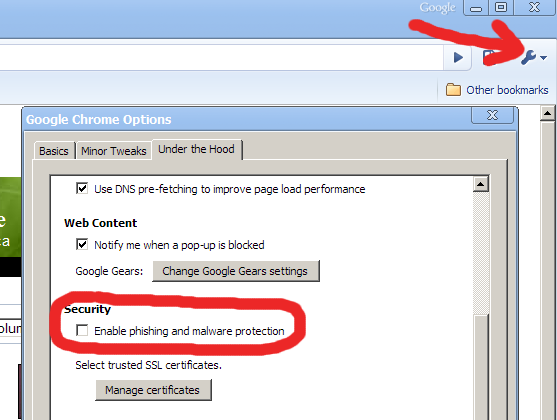
Google Chrome will thrash to disk a lot to disk, at least in version 0.2.149.27, build 1583 (the first publically available beta) in Windows XP. It is so bad that my entire computer locks up a bit and becomes unresponsive. Disabling phishing and malware protection seems to stop the thrashing:
- Click on the monkey-wrench icon to the right of the address bar.
- Choose "Options" from the menu.
- Click the "Under the Hood" tab
- Disable the "Enable phishing and malware protection" check-box
According to procmon it is writing to this filename: <systemdriveletter>:\Documents and Settings\<username>\Local Settings\Application Data\Google\Chrome\User Data\Safe Browsing. There is only one other site where people are talking about this thrashing problem, at Ars Technica.

Recent comments