linux

Bye Bye Ogg Vorbis, hello VBR mp3

Part of my music collection is stored as *.mp3 and part of it as *.ogg files (vorbis encoded). We have a portable Samsung YP-T9 which, when we purchased it at Future Shop about 4 months ago was one of the few devices that played ogg files (which is why I bought it). Even then, I had to update the firmware so that it would play oggs, and although it plays ogg files perfectly well, it does not recognize the ogg tags! So all the files get thrown into the "Unknown" artist and "Unknown" track basket. It sucks. I tried all sorts of tricks like embedding id3 tags in the files as well as the ogg tag and renaming the files to mp3s but nothing works. Apparently others have had problems with their ogg tags not being recognized as well. I got really pissed off. Partly at Samsung and partly at myself for encoding these CDs into ogg format in the first place.

What is the advantage of ogg format anyways? Better quality than mp3 for the same file size is how it can be explained most simply. But who gives a damn about filesize these days with 0.5 TB hard drives going for $115. If you want high quality forget disk space and go with Flac or use VBR mp3 or 320kbps CBR mp3. If you're tight on disk space your encoding is going to be lossy no matter what and it will sound like crap. The only reason I can think for using ogg many years ago when I did was that VBR was fairly new at that time and was not fully supported by all players and hard drive space must have been more expensive.

I also just bought a Squeezebox Receiver and Controller and I don't want to discover some flaw in its ogg tag support when I'm hosting a party and trying to play some oggs.

Luckily most of my oggs were ripped off of CDs that I still have in storage. I am in the process or re-ripping those CDs into mp3s. I knew nothing about mp3 conversion before so I did some reading about it. This list of recommended LAME settings was the most helpful in addition to the lame man page. I eventually decided upon the following:

lame --preset fast standard *.wav *.mp3

A couple notes, the "fast" option adds the --vbr-new setting, the "standard" option is equivalent to "-V 2" and the -h option is not necessary with VBR. This gives a target bitrate of 190 kbps which is good enough for me. I did think about using flac but I don't care that much about audio quality, and I would rather not to have to upgrade my hard drive in order to be able to use flac for everything.

For some CDs that I really care about, such as Pink Floyd, I rip it using

lame --preset fast extreme *.wav *.mp3

which gives an average bitrate of around 245 kbps.

Tags:

Just Pre-Ordered a Squeezebox Duet

My wife and I just pre-ordered a Squeezebox duet today that should be arriving here at the end of February. It's a device that will allow us to access the mp3/ogg library on our PC from another room in the house (without requiring a laptop). Before the introduction of the display-less Squeezebox Receiver and Squeezebox Controller, the only choice was the Squeebox unit, which comes with a simple remote. I don't have much use for a display like that on the original Squeezebox. For me it is much more useful to have one nice remote with a display and multiple display-less receiver units.

The Squeezebox line is similar to Sonos' devices, and they are now in direct competition with the introduction of the Squeezebox controller. The only problem with Sonos is that it is so god damn expensive, not to mention that their devices are much bigger. Sure it is more powerful, allowing you to connect to up to 16 devices with Samba shares or Windows shares on them and one of their devices has an amplifier whereas all the Squeezebox devices require a separate amplifier or powered speakers. Fortunately we don't have any good speakers of our own already so we'll just buy a few nice Bose powered speakers. Then maybe buy a couple more along with another Squeezebox Receiver and expand our network.

Squeezebox has the advantage that it's SlimServer software is open source so it is constantly being updated and improved and it is written in Perl so it is totally cross platform. It's unfortunate that it is written in Perl actually, but I guess they could have chosen an even worse language.

rsnapshot or flexbackup?

My backup solution used to be flexbackup. In fact I am still using it while I evaluate rsnapshot. I recently had bought 2 320G drives and used them in a RAID1 configuration. These eventually appeared to fail (they have since been "repaired" by using Seagate's SeaTools software; apparently RAID arrays don't like bad blocks too much) and I reverted back to the old 120G drive that I was using before I went to the RAID1 configuration. Anyways, during the period that I thought my drives or motherboard were totally screwed up (thanks for SeaTools Desktop which is not very good, unlike SeaTools for DOS which is) I bought a new computer since I sort of needed one anyways.

In my new computer I got another 320G hard drive (no RAID1 this time). So I have two extra 320G drives laying around (that had since been repaired using SeaTools for DOS). I decided to use these two drives as backups. For a while I kept my flexbackup nightly cron jobs going, which tarball up my user data and puts it on my MythTV box (which has lots of free space). And I used my 320G drives as an rsync backup of my entire drive. This was kind of lame, but I liked how all the data was right there. No tarballs to unpack. It sucks not having nightly or weekly backups though.

Then I discovered rsnapshot. It essentially makes uncompressed incremental backups while still giving you a snapshot of your entire drive (except any "excludes"), through the magic of hard links. With the price of hard disks these days, it makes absolutely no sense to use compression. If network traffic is an issue, then maybe. But if you're mostly backing up photos like me, then compression won't help too much.

So I put each of my 2 320G hard drives in an enclosure (with eSATA). Every Sunday I will rotate them out and take one of them to work as an off-site backup. The is the first time ever that I have had true off-site backup. Normally I have backed up my stuff to the same machine, same hard drive, different hard drive, or a different machine in the same building. Recently after moving into a new place I became a bit more worried about a buglar making off with both my main machine and my mythtv box that had my flexbackup backups on it. rsnapshot and the fact that I have tons of space on 2 320G drives seems to be providing the perfect solution for me right now: incremental backups, nightly snapshots of all my data without compression, and off-site backup.

Tags:

HP Officejet 5610 Works Great in Linux

I just bought an HP Officejet 5610 4-in-1 for home because we had a need for a copier and a fax machine. A scanner is something I also occasionally wish I had. So this thing does it all, and the best part is that it all works flawlessly in Linux, which is the reason I bought it (see "HP all-in-one device works great with Linux"). In fact, installing it was probably easier than it would have been in Windows for the following reasons:

  • No need to insert a CD
  • No need to reboot
  • No need to finick with Windows and the way it handles USB devices. (If you've ever accidentally plugged a device into the USB port before installing the drivers and had it not work in the end then you know what I mean).
  • No navigating through any install wizards

Photocopying and faxing (from the tray) worked right away without even plugging it into the computer.

Printing worked almost instantly (turns out that hpijs and hplip were already installed on my Ubuntu Feisty box, but I needed to install hpijs-ppds to get the HPLIP ppds) after adding the printer using KDE's printer management interface (I used to use the cups web interface but the KDE one is a bit easier to use nowadays). I haven't tried printing photos yet but there is a photo-quality option in the printer settings called "600 dpi, Photo, Full Bleed, Black + Color Cartr., Photo". I'm sure it works fine, just as it did for my old HP 710C and 920C.

I wasn't sure how to setup a fax queue in CUPS. It turns out the best way to do this (and to install a printer driver) is to just run "hp-setup". This installed a printer and a fax queue. So I just deleted the redundant printer that I had created in the paragraph above. The "hp-setup" wizard was maybe even a bit easier than the KDE Cups one. Now I have a fax and a printer in cups. I haven't tried faxing yet but printing to the fax queue works and I can see the faxes when I run "hp-sendfax" so it probably works.

Scanning was a breeze. No driver installation required, all I had to do was run kooka or xsane (better) and the scanner is detected automatically. xsane is really powerful and can do some automatic contrast and brightness adjustments as well as provide full manual control.

I would recommend this printer to anyone! I also use a Samsung ML-1740 laser printer by the way, and it is great and works well in Linux too. I have refilled the cartridge about 4 times now with cheap toner and the same cartridge works great. I was also able to get a backup refurbished cartridge for cheap.

Tags:

Limit Size of Subversion Commits With this Hook

We have experienced some abuse of our subversion repository at work recently. Someone committed 400 MB of data all at once including many object files, libraries, and executables. I did not get very harsh with the person who did this. Because a) I have no objection to binaries in subversion in the first place, b) I don't really know what he's working on, c) disk space is cheap and we are no where near capacity, and d) his commit was still smaller than a few commits we had a long time ago (which were legit). Still, if you just allow people to commit whatever they want to your subversion repository, in the worst case, you could run out of disk space, necessitating an svn dump-and-load onto a new larger drive (pain). It would suck to have to do that just because some people were committing large binaries (without any legitimate reason to). There are other annoying consequences. Our tarball backups of svn currently fit on a DVD, which is cheap and easy, if we allowed this abuse to continue it would complicate our backup process.

What I wanted was a way to limit the commit size for certain users automatically. There did not seem to be any hooks out there to do this, so I wrote one.

Just paste the following into your pre-commit hook:

/svn/repos/hooks/check_txn_size.py "$REPOS" "$TXN" || exit 1

and paste the following into a check_txn_size.py file in your hooks directory and make it executable.

#!/usr/bin/env python
import sys,os,popen2
 
MAX_BYTES = 1024000
DEBUG = False
SVNLOOK = '/usr/bin/svnlook'
ALLOWED_USERS = ['david', 'ctang', 'vjain', 'mike', 'sbridges', 'tcirip']
ADMIN_EMAIL = 'admin@company.com'
 
def printUsage():
  sys.stderr.write('Usage: %s "$REPOS" "$TXN" ' % sys.argv[0])
 
def getTransactionSize(repos, txn):
  txnRevPath = repos+'/db/transactions'+'/'+txn+'.txn'+'/rev'
  return os.stat(txnRevPath)[6]
 
def printDebugInfo(repos, txn):
  for root, dirs, files in os.walk(repos+'/db/transactions', topdown=False):
    sys.stderr.write(root+", filesize="+str(os.stat(root)[6])+"\n\n")
    for name in files:
      sys.stderr.write(name+", filesize="+str(os.stat(root+'/'+name)[6])+"\n")
 
def checkTransactionSize(repos, txn):
  size = getTransactionSize(repos, txn)
  if (size > MAX_BYTES):
    sys.stderr.write("Sorry, you are trying to commit %d bytes, which is larger than the limit of %d.\n" % (size, MAX_BYTES))
    sys.stderr.write("If you think you have a good reason to, email %s and ask for permission." % (ADMIN_EMAIL))
    sys.exit(1)
 
def getUser(repos, txn):
  cmd = SVNLOOK + " author " + repos + " -t " + txn
  out, x, y = popen2.popen3(cmd)
  cmd_out = out.readlines()
  return cmd_out[0][:-1]
 
if __name__ == "__main__":
  #Check that we got a repos and transaction with this script
  if len(sys.argv) != 3:
    printUsage()
    sys.exit(2)
  else:
    repos = sys.argv[1]
    txn = sys.argv[2]
 
  if DEBUG: printDebugInfo(repos, txn)
  user=getUser(repos, txn)
  if DEBUG: sys.stderr.write("User:"+user)
  if DEBUG:
    if (user in ALLOWED_USERS):
      sys.stderr.write(user+" in allowed users")
    else:
      sys.stderr.write(user+" not in allowed users")
  if (user not in ALLOWED_USERS):
    checkTransactionSize(repos, txn)

Setting Up postfix to send outgoing mail on ubuntu

I don't know why but this is one of those things that I find extremely annoying to set up. Mainly because it often requires installing a full-blown MTA to do a much simpler job than it was designed to do. Unfortunately, ssmtp and exim, the only simpler ones, often suck (especially ssmtp, which even the maintainer gave up on). What follows is how I got postfix working on my Ubuntu Feisty machine (should work on more recent version of Ubuntu as well):

sudo apt-get install postfix
sudo dpkg-reconfigure postfix

Here are the options to answer in order:

"satellite" (when given the list of configuration styles)
<your normal user> (where to forward root's mail to)
<your host name>
<your ISP's smtp server>
accept default (when asked what other domains to accept mail from)
No (default is no synchronous updates on mail queue)
127.0.0.0/8 (accept default unless you know what you are doing)
0 (mailbox limit)
+ (default)
all (default)

Reload or restart postfix, then do some testing:

sudo apt-get install mailx
echo test |mail -s "test mail sent to external" me@gmail.com
echo test |mail -s "test mail sent to normal user" <normal user name>
echo test |mail -s "test mail sent to root" root

You should get an email to your external address. And if you run

mail

you should see 2 emails there for you, one that was sent to root (but was directed to you, see /etc/aliases for why) and the other that was sent to you.

To have those mails sent to an external address instead (like your me@gmail.com address) do the following:

echo me@gmail.com > ~/.forward

Update (2007-07-19): When I changed ISPs, my new ISP did not like my From: address being david@centurion (I just named it after the case model). So I had to do the following. Add this to /etc/postfix/main.cf:

smtp_generic_maps = hash:/etc/postfix/generic

Add this to /etc/postfix/generic:

@centurion      david@telus.net

I just made up an email address there to make it happy.
Don't forget to run sudo postmap /etc/postfix/generic

Copy ssh Public key to Server in one line

Update (2011/02/06): you don't really need any of the commands below, you can just use the ssh-copy-id program that comes with ssh.

Here it is:

cat ~/.ssh/id_dsa.pub | ssh user@hostname "cat - >> ~/.ssh/authorized_keys"

Apparently some people don't like this one that much. :-)

Here's an alternative:

ssh user@hostname "echo `cat ~/.ssh/id_dsa.pub` >> ~/.ssh/authorized_keys"

It doesn't require the first cat or the pipe.

Tags:

$10 Linux Distribution Donation Challenge

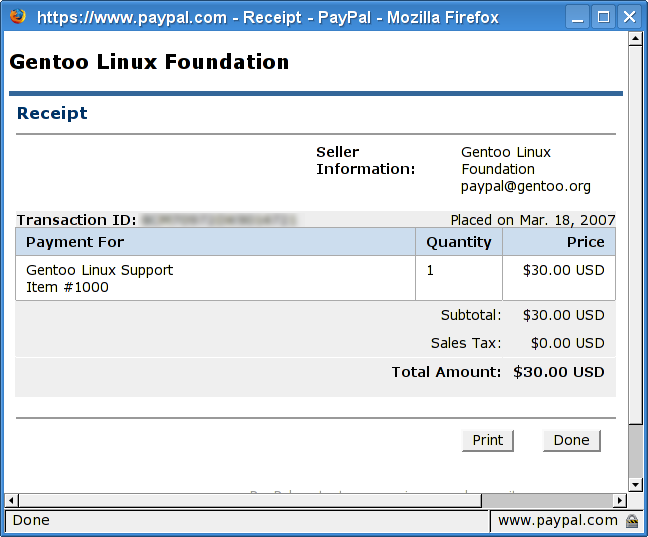
Someone named Thomas Cort had a create idea. For everyone to donate $10 to their software distribution for each installation they have. It got me thinking...I have been using Gentoo for almost 5 years now and I don't think I have given them a penny yet. I have done some volunteering, submitting patches and new ebuilds and such (my bugs), but no cash donations. Considering that Winblows costs well over $10 and I have been using Gentoo for 5 years for free, I am getting a good deal. Gentoo has been getting bashed around a bit lately too...so I feel bad for it. Gentoo is an excellent quality distribution with great developers and this $30 USD donation I just made is my endorsement.

I, too, would like to challenge everyone who uses a Free / Open Source operating system to make a $10 donation to their software distributor for each installed system they have.

Fast Python Script to Get Photos off an iPhoto CD

My uncle came over with a CD of photos from his trip to Peru. I am pretty sure the CD was created with iPhoto as there was an iphoto.xml file in the root of it. Anyways the first problem I had was viewing the pictures after mounting the CD. The file sizes were all weird (too small considering the camera that was used to take them) and some file names were duplicated. Trying to open them up with kuickshow or imagemagick did not work. Then I remembered that this happened before when we got our photos from our wedding photographer (also a Mac user). The solution is to not use the "auto" filesystem type, but to use "iso9660" instead. I forgot to check what the "mount" command actually said it had mounted it as, but mounting it manually from the command line with the "-t iso9660" option fixed it (my fstab has "auto" for the cdrom filesystem type). After fixing that, the filenames of all the photos were unique and the file sizes seemed more reasonable (~2.5 MB).

The second problem was that the photos were not stored in a flat hierarchy in one single directory, there were stored in the year/month/day directory hierarchy. kuickshow, an excellent image viewer/slideshow program, did not want to handle these directories recursively. So I had to whip up a quick python script. I knew I probably could have done it in bash too. But I don't know bash and it's not as readable. Relies too much on special punctuation to do things, kind of like perl. I hate the [-e and [-n kind of stuff, and the dollar signs. So ugly. Here's the quick script:

#!/usr/bin/env python
import os
from os.path import getsize
import shutil
dir='/mnt/cdrom/'
dest='~/tempphotos'
for root, dirs, files in os.walk(dir):
    for file in files:
        fullpath=root+'/'+file
        destpath=dest+'/'+file
        if getsize(fullpath) > 200000:
            shutil.copyfile(fullpath, destpath)

It worked great. Pythonistas will not be too impressed by this 10-liner. I'm mainly just showing that for those who have never used Python or those who have only used Python a little. It makes a great bash replacement, better than Perl because you can read it again later and actually understand it. I have used for many other such tasks, most of them more complicated than this one.

The getsize(fullpath)>200000 was to filter out the thumbnails which iPhoto also included on the CD. The fact that it included thumbnails is the dumbest thing in the world by the way. If you are exporting files on a CD one would expect that the person who exported it was going to give the CD to someone else and that someone else might not have iPhoto, so the thumbnails become totally useless. In my opinion, thumbnails are something should be filed away in a hidden cache directory on the user's hard drive, and not seen anywhere else. GIMP used to put thumbs in a .xvpics folder, something else uses ThumbsDB (Windows?). Picasa (correctly) puts them somewhere where I can't see them.

The only other problem was that stupid iPhoto had duplicated some photos so they appeared twice. I realized afterwards that some folders had a thumbs directory and an originals directory, and some originals in the the directory itself. This might have been because there were modifications to the original so the originals were copied automatically to a sub-folder before being modified.

Top 10 Reasons to Choose Linux over Vista

Some people have asked me if they should upgrade to Vista. I usually suggest that they instead switch operating systems completely. Especially if they are the types that use their computer for web browsing and email. Here are ten reasons why I think all Windows users should at least think about Linux this time instead of Vista.

  • Digital Rights Management - Why cripple your computer and yourself with DRM when you can just use Linux?
  • Security - No more worms, viruses (look at this very short list of Linux viruses), virus scanners, spyware, pestware.
  • Beryl - Totally kick-ass effects and Mac OS X expose-like feature. Compared to Microsoft's Aero product, it is a lot better and is getting better all the time.
  • Ubuntu - I would be reluctant to recommend Linux to the general public if it were not for Ubuntu. It has truly made the "Linux Desktop" a reality.
  • Google - Google has given us the best mail application, a decent word processor and spreadsheet application, a feed reader, a Calendar, and so much more, all over the web so not only are these applications not tied to any particular computer, they also don't tie you to any particular OS. (Also, Google ported Picasa, the best photo management software to Linux recently).
  • Firefox - How could one use all those applications from Google and others if it were not for Firefox, the cross-platform IE-killer?
  • OpenOffice - For all your old Microsoft Office documents and new documents, this does the job. No need to be tied to Windows and Microsoft Office anymore.
  • Software choice - Tons more applications. Linux has a huge variety of choice when it comes to applications. There is even choice when it comes to your desktop environment (KDE, Gnome, etc...).
  • Cost - Linux is free, Windows is expensive. As hardware prices have come down (while the price of Windows hasn't), this expense is becoming a larger percentage cost.
  • Linux (no matter what flavour you get) is updated multiple times per year with the latest and greatest. With distributions like Ubuntu these updates can be installed seamlessly, never needing a clean install again. Don't settle for crap from Microsoft, a company that took 5.5 years to deliver a marginally better OS than the last one.

Ok, clearly 10 isn't enough, here are some more...

  • Software Installation - With Linux with the press of a button you can install a program and all its dependencies. Not only that but smart package managers like apt-get can remove dependencies that are no longer required by any other program.
  • Stability - There is no such thing as the blue screen of death in Linux. Actually the blue screen is now a rare occurrence in XP but I saw it happen twice on two different machines in the past month, so it is definitely still there. Linux users are known to brag about their computer's "uptime" -- the amount of time their computer has been turned on since the last reboot. Linux lock-ups or crashes can occur but it is generally agreed that these are far less likely to occur than with Windows.
  • Minimal Hardware Requirements - You can run Linux on almost anything. I run it on a 500MHz laptop with 256MB RAM just fine. I just chose a lighter desktop manager. If you are running Windows XP right now, your computer will only get slower with Vista. Switching to Linux might allow you to keep the hardware you have now for another few years comfortably.

(Update 2007/02/23) Wow, my first time on digg. A lot of the comments on digg were pretty negative but at least 88 people dugg it (actual number was higher since surely some people buried it). The audience was not really techies but more people like my grandma, parents, sister people who would actually learn something from the article and can mostly understand the gist of it. So I don't really care if some geeks are pulling their hair out. Someone even insulted my website, another took a jab at my credibility because I blogged about the new Canada Food Guide. Another had some comments about my resume which is at least 4 or 5 years out of date. Anyways, this says way more about the digg readership or at least a vocal minority of it. It was fun to get on digg though in a significant way.

Tags:

Why Gentoo is Still Better than Ubuntu

So I am on a Kubuntu edgy laptop at work and I am trying to get WPA wireless networking working before the upcoming demo that we are putting on. Since I have no idea what kind of networking is set up at both demo locations I am making sure all options work. WPA is the last one to take care of.

I finally found a front-end for wpa_supplicant that actually works. It's called kwlan and it is currently at version 0.5.8. Ubuntu edgy only has version 0.4.7. I really want 0.5.8 because 0.4.7 has some glaring bugs. Feisty actually has 0.5.8. There is no way I am upgrading this entire box to feisty. Because of ubuntu's binary nature, in order to get kwlan-0.5.8 installed I might actually have to bump a lot of packages to feisty just to get it working. Even if I just want kwlan-0.5.8, how to I get it? I'll have to add some sources to /etc/apt/sources.list and possibly jump through a few more hoops to be able to install one package from feisty without apt-get upgrade wanting to upgrade everything to feisty. If kwlan-0.5.8 wasn't available in feisty, my only option would be to make my own deb package. Good luck with that (I maintained a debian package once, called camserv a long time go. Way harder than ebuilds.)

In gentoo it is as simple as coping the ebuild to my /usr/local/portage folder, renaming it to kwlan-0.5.8.ebuild, creating the digest and then emerging the 0.5.8 version. Assuming the upstream developer did not make massive changes to the build process, simply renaming the ebuild name from kwlan-0.4.7.ebuild to kwlan-0.5.8.ebuild should work. Like a lot of things, it's a hell of a lot easier in Gentoo.

Sure that's just one reason why Gentoo is better than Ubuntu. There are many others. Just look at Ubuntu Guide. A whole friggin' guide to install a lot of things that can be easily installed in Gentoo (mplayer, acrobat, java, flash, etc...). Not to mention that eix rocks compared to anything apt has, and paludis is awesome. Every time I think Ubuntu is better than gentoo, I end up taking that back soon after.

My New 320G Hard Drives using RAID and LVM

I just bought two new 320G hard drives last weekend and they are finally up and running with my same old Gentoo Linux OS. I wanted to put them in a RAID1 configuration and this was my first experience with software RAID.

The first time I did it I just made took one third of the new drive (about 120G) and made it a RAID1, then copied the old hard drive over. I purposefully chose not to use LVM because I have used it before and although it is extremely handy I have always been worried about the difficulty of recovering data from a bricked drive when the data is scattered all about. After copying data over to this one big partition I realized that it wasn't so easy to resize a RAID. I also read about how bad it was to have everything all on one partition (/home, /, /var, etc...). So I did a complete 180 and decided to use LVM.

Here is my partition layout:

Disk /dev/sda: 320.0 GB, 320072933376 bytes
255 heads, 63 sectors/track, 38913 cylinders
Units = cylinders of 16065 * 512 = 8225280 bytes

   Device Boot      Start         End      Blocks   Id  System
/dev/sda1         1       13      104422   fd  Linux raid autodetect (/boot, in /dev/md1)
/dev/sda2        14      622     4891792+  fd  Linux raid autodetect (empty, for Xen later, in /dev/md2)
/dev/sda3       623      866     1959930   fd  Linux raid autodetect (/, in /dev/md3)
/dev/sda4       867    38913   305612527+   5  Extended
/dev/sda5       867     5730    39070079+  fd  Linux raid autodetect (for LVM, in /dev/md5)
/dev/sda6      5731    10594    39070079+  fd  Linux raid autodetect (for LVM, in /dev/md6)
/dev/sda7     10595    15458    39070079+  fd  Linux raid autodetect (for LVM, in /dev/md7)
/dev/sda8     15459    20322    39070079+  fd  Linux raid autodetect (for LVM, in /dev/md8)
...
lots of free space
...
/dev/sda9     38670    38913     51657007   82 Linux swap / Solaris (in /dev/md9)

/dev/sdb looks exactly the same of course, which you can do very easily with:

sfdisk -d /dev/sda | sfdisk /dev/sdb

Basically /dev/sda5 onward are all 40G physical partitions. I'll RAID1 them with the corresponding partitions on /dev/sdb. I have also RAID'ed the /boot partition and the root partition, and the sdb2/sda3 partitions for future use. So far, I have 7 raids:

-(~:$)-> cat /proc/mdstat
Personalities : [linear] [raid0] [raid1] [raid6] [raid5] [raid4]
md8 : active raid1 sdb8[1] sda8[0]
      39069952 blocks [2/2] [UU]

md7 : active raid1 sdb7[1] sda7[0]
      39069952 blocks [2/2] [UU]

md1 : active raid1 sdb1[1] sda1[0]
      104320 blocks [2/2] [UU]

md2 : active raid1 sdb2[1] sda2[0]
      4891712 blocks [2/2] [UU]

md3 : active raid1 sdb3[1] sda3[0]
      1959808 blocks [2/2] [UU]

md5 : active raid1 sdb5[1] sda5[0]
      39069952 blocks [2/2] [UU]

md6 : active raid1 sdb6[1] sda6[0]
      39069952 blocks [2/2] [UU]

unused devices: 

I then made md5, 6, 7, and 8 LVM physical volumes and then shoved into an LVM volume group using pvcreate, vgcreate, and vgextend:

# pvs
  PV         VG   Fmt  Attr PSize  PFree
  /dev/md5   vg   lvm2 a-   37.26G      0
  /dev/md6   vg   lvm2 a-   37.26G 528.00M
  /dev/md7   vg   lvm2 a-   37.26G      0
  /dev/md8   vg   lvm2 a-   37.26G  29.52G
# vgs
  VG   #PV #LV #SN Attr   VSize   VFree
  vg     4   5   0 wz--n- 149.03G 30.03Gsonata opt # vgs
  VG   #PV #LV #SN Attr   VSize   VFree
  vg     4   5   0 wz--n- 149.03G 30.03G

Then I created some LVM logical volumes using lvcreate:

# lvs
  LV   VG   Attr   LSize  Origin Snap%  Move Log Copy%
  home vg   -wi-ao 80.00G
  opt  vg   -wi-ao  2.00G
  tmp  vg   -wi-ao  2.00G
  usr  vg   -wi-ao 20.00G
  var  vg   -wi-ao 15.00G

I keep /home, /opt, /tmp, /usr and /var separate. That's why my root (/) partition on /dev/md3 only needs to be 2G.

The reason I made a bunch of RAID's and put them in the LVM rather than just one big RAID is because it means I haven't tied my entire drive down to anything. I can always move data off of one partition later using a few LVM commands and install another OS if I have to. Few people do this, but I think it is a good idea. On my computer at work, I did something similar. I split my hard drive into chunks of 40G and then threw into an LVM. Splitting your hard drive into multiple physical partitions is very useful.

The other thing I did was put the swap drive at the end of the hard drive. It is easy to make it bigger that way. So many people make one of their primary partitions at the beginning of the hard drive into a swap partition, which I can never understand. I almost always end up adding more RAM to my computer and thus needing to make my swap partition bigger. When it is at the beginning of the drive, it means you have to add a new one at the end, where you have free space. Putting my swap at the end of the drive in the first place means I don't have to have 2 swaps later. Given the complexity of my drives as it is, this swap thing is a minor concern.

I also plan on putting Xen on /dev/md2 later. I hope to be able to boot into an OS on /dev/md2, then start up the Gentoo Linux on /dev/md3. If I ever need to restart my Linux on /dev/md3 I can reboot it without turning off the computer. It would also allow me to run Windows XP under Xen rather than under VMWare as I do know. From what I hear Xen has better performance.

The main thing left for me to do is to buy another 320G drive and set up an rsync backup from the 320G RAID to the backup drive (probably in a USB adapter case). As most people probably know, RAID does not replace backups. RAID just protects you against hardware failure. It does not protect you against "rm -rf /". These drives were only $110 CAD each, so getting another backup drive is no big deal.

One other thing that I did differently than usual is that I made all my filesystems ext3, rather than reiserfs (as I normally do). One of the reasons is that I had far too many cases where my reiserfs partitions got screwed up. In fact even my old hard drive had a screwed up directory that was not fixable, unless I ran the reiserfsck program with the --rebuild-tree option, which is not a very safe option. It turns out the directory was not an important one. Anyways, I have never had a problem with ext2 or ext3 ever, so I went with those instead.
Switched from Portage to Paludis

I switched to Paludis yesterday. For those who don't know what Paludis is, it's an alternative Gentoo package manager, or a Portage/emerge replacement. It has not all been smooth. I had to fight with it for a while, re-installing a bunch of packages that thought they depended on an installed package that no longer existed. I think this was because Portage left some cruft around that made it think that. The problems were mainly to do with kdelibs-3.4* (which a lot of installed packages thought they had a block on) and with guile (which moved to a new category but some packages weren't aware of the switch). Re-installing worked in most cases.

The other wrinkle was that the portage2paludis.bash script that I used according to the migration instructions didn't bring all my repositories over, including my /usr/local/portage and a few others. The second annoyance was that a few repositories didn't have profiles/repo_name and profiles/categories files in them (which paludis requires) and this causes a bunch of warnings about how paludis is "faking it." I finally got it to the point where I could do "paludis -ip world" and I got no warnings and no errors.

The only remaining problem is that the gentoo java packages are mostly unusable with paludis because none of the hooks in the java gentoo eclasses get installed into paludis' hooks system (and paludis doesn't call the hooks in the java eclasses). Apparently the Gentoo Java team was "abusing the [portage] hooks in [their] eclasses." They should be installing the hooks into the paludis hooks directories. Paludis hooks are similar to subversion's hooks system. They allow you to do a lot of fancy things.

Overall I am impressed with Paludis. Running "paludis -ip world" is a lot faster than "emerge -uva world" or "emerge -uvaDNt world" but more important than speed is that it was designed from scratch, without all of portage's warts and messy hard-to-change code. In a way, paludis is to portage what svn is to cvs. You can read all about the differences between Paludis and portage here.

One more thing happened yesterday, that was a little bit scary. I tried to reboot to try out a new kernel and I noticed the "reboot" and "shutdown" commands were no longer there. I rebooted anyways but hitting the reset button but the system wouldn't load, it stopped right after the kernel was done starting up. It turned out Paludis had uninstalled sysvinit when I ran "paludis --uninstall-unused" and I didn't notice. Reinstalling it fixed everything but I got really scared that the reboot and shutdown binaries were missing due to dataloss.

Drag & Drop from Linux (KDE, Gnome) File Managers (Konqueror, Nautilus) to Java Applications

I tried a few months ago to get drag & drop working from Konqueror to a Java application but it didn't work. Two programmers (myself and another) each had a crack at it and couldn't get it to work. I found one link through Google that seemed to be promising (see reply 23 or 23) but that didn't work. Then finally today by using slightly different keywords in my Google searching, I managed to find this link, which led me to this bug report. It turns out the "workaround" works great and I got it working. Works with Konqueror as well as Nautilus. Haven't tried any other Qt/KDE or GTK applications. Should work with Windows as well of course. I am attaching a trimmed down version of the workaround version with only the essentials to get this working. It it a lot nicer looking than the forum.sun.com link above. I had such a tough time finding the solution to this online, I hope others find this blog post and thus have an easier time at it than I did.

AttachmentSize
Plain text icon TestDragDropLinux.java_.txt3.46 KB

Planet Larry

I am excited to be a part of Planet Larry. I don't write about Gentoo too often, but once in a while I might have something interesting to say about it. For those that are interested, my past articles on Gentoo, and my past articles on Linux.

Tags:

Pages

Subscribe to RSS - linux